aSim
551
Runs
0
Followers
0
Following
Jake
@aimbot4738
Can make any Aimbot For any game
Sims
592
0
0
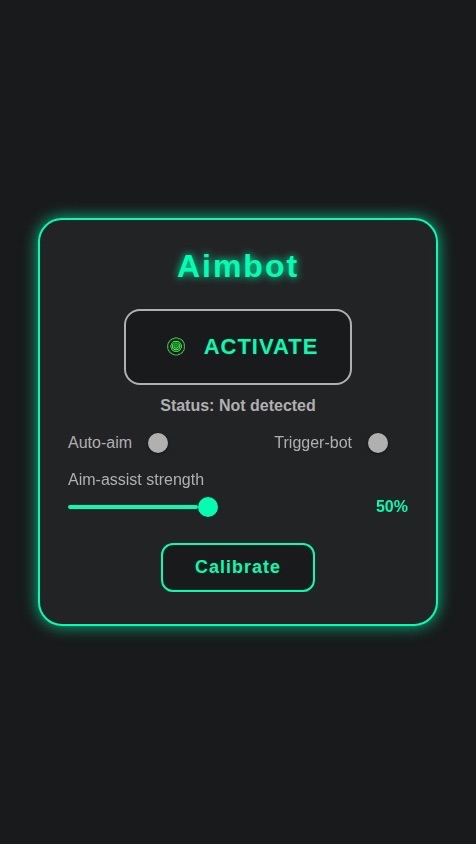
Create a native mobile app that simulates a gaming "Aimbot" utility, based on the design in the attached image: https://s.asim.sh/images/u0PRL7t0ZvDDR5TRfD8tr.jpeg The app should have a single main screen with the following features: 1. **UI and Layout**: * Replicate the dark theme, color scheme (green accents, grey tones), and layout from the image. * The title of the app should be "Aimbot". 2. **Main Activation Button**: * A large, central button with a target icon labeled "ACTIVATE". * Tapping this button should toggle the app's status. * When toggled ON, the button text should change to "DEACTIVATE" and the status text below it should read "Status: Active". * When toggled OFF, it should revert to "ACTIVATE" and "Status: Not detected". 3. **Control Toggles**: * Include two toggle switches labeled "Auto-aim" and "Trigger-bot". * Users should be able to turn these on and off independently. 4. **Aim-Assist Slider**: * Implement a slider labeled "Aim-assist strength". * The slider should range from 0% to 100%. * Display the current percentage value next to the slider as the user adjusts it. 5. **Calibration Button**: * Include a "Calibrate" button. * When tapped, it should show a loading indicator or a simple "Calibrating..." message for 2-3 seconds, then return to normal. This simulates a calibration process. 6. **Data Persistence**: * All user settings (the activation state, toggle switch states, and the slider's value) must be saved persistently. * When the user closes and reopens the app, their last configured settings should be loaded automatically. Data should be linked to the current user.

© 2025 aSim. All rights reserved.
592
0
0
Create a native mobile app that simulates a gaming "Aimbot" utility, based on the design in the attached image: https://s.asim.sh/images/u0PRL7t0ZvDDR5TRfD8tr.jpeg The app should have a single main screen with the following features: 1. **UI and Layout**: * Replicate the dark theme, color scheme (green accents, grey tones), and layout from the image. * The title of the app should be "Aimbot". 2. **Main Activation Button**: * A large, central button with a target icon labeled "ACTIVATE". * Tapping this button should toggle the app's status. * When toggled ON, the button text should change to "DEACTIVATE" and the status text below it should read "Status: Active". * When toggled OFF, it should revert to "ACTIVATE" and "Status: Not detected". 3. **Control Toggles**: * Include two toggle switches labeled "Auto-aim" and "Trigger-bot". * Users should be able to turn these on and off independently. 4. **Aim-Assist Slider**: * Implement a slider labeled "Aim-assist strength". * The slider should range from 0% to 100%. * Display the current percentage value next to the slider as the user adjusts it. 5. **Calibration Button**: * Include a "Calibrate" button. * When tapped, it should show a loading indicator or a simple "Calibrating..." message for 2-3 seconds, then return to normal. This simulates a calibration process. 6. **Data Persistence**: * All user settings (the activation state, toggle switch states, and the slider's value) must be saved persistently. * When the user closes and reopens the app, their last configured settings should be loaded automatically. Data should be linked to the current user.
See Jake's profile on the app
Follow your friends and make your own Sims on the app.
Download aSim