
aSim
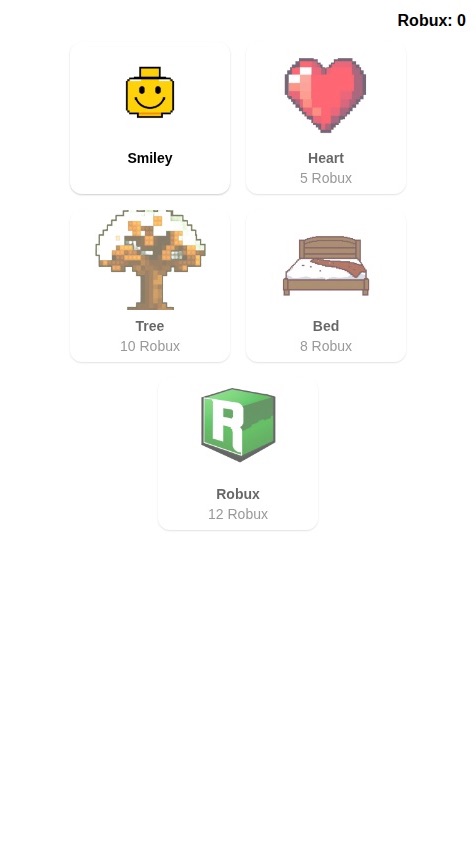
Screenshot of Create a 2D pixel art building game where users create pictures by filling a grid with colored squares.

The app should have the following core features:

1.  **Template Gallery:**
    *   Display a gallery of pixel art templates.
    *   Each template should show a preview image of the final artwork, its name, and the "GameBux" cost to unlock it. A few simple templates should be free to start.
    *   Mark templates that the user has already completed.

2.  **Building Screen:**
    *   When a user selects a template, they are taken to a building screen with a blank grid.
    *   A color palette with all the necessary colors for the artwork should be visible.
    *   A reference image of the completed artwork should be displayed.
    *   The grid squares should be numbered to guide the user on which color to place where (a "color-by-number" mechanic).
    *   Users select a color from the palette and then tap the corresponding numbered squares on the grid to fill them.

3.  **Rewards & Currency:**
    *   When a user correctly fills in all the squares and completes the artwork, award them 10 "GameBux".
    *   The user's total "GameBux" balance must be clearly visible in the app, for instance, on the gallery screen.

4.  **Data Storage:**
    *   Use a database to persistently store each user's data, including their "GameBux" balance and the status (locked/unlocked/completed) of all art templates.
Create a 2D pixel art building game where users create pictures by filling a grid with colored squares. The app should have the following core features: 1. **Template Gallery:** * Display a gallery of pixel art templates. * Each template should show a preview image of the final artwork, its name, and the "GameBux" cost to unlock it. A few simple templates should be free to start. * Mark templates that the user has already completed. 2. **Building Screen:** * When a user selects a template, they are taken to a building screen with a blank grid. * A color palette with all the necessary colors for the artwork should be visible. * A reference image of the completed artwork should be displayed. * The grid squares should be numbered to guide the user on which color to place where (a "color-by-number" mechanic). * Users select a color from the palette and then tap the corresponding numbered squares on the grid to fill them. 3. **Rewards & Currency:** * When a user correctly fills in all the squares and completes the artwork, award them 10 "GameBux". * The user's total "GameBux" balance must be clearly visible in the app, for instance, on the gallery screen. 4. **Data Storage:** * Use a database to persistently store each user's data, including their "GameBux" balance and the status (locked/unlocked/completed) of all art templates.

by @fffh
  • 1.0k views

This mini-app runs in the aSim app.

Get the aSim appAlready have aSim?Open in app