aSim
738
Runs
1
Followers
0
Following
Cory Walls
@walls
No bio ...yet
Sims
772
1
0
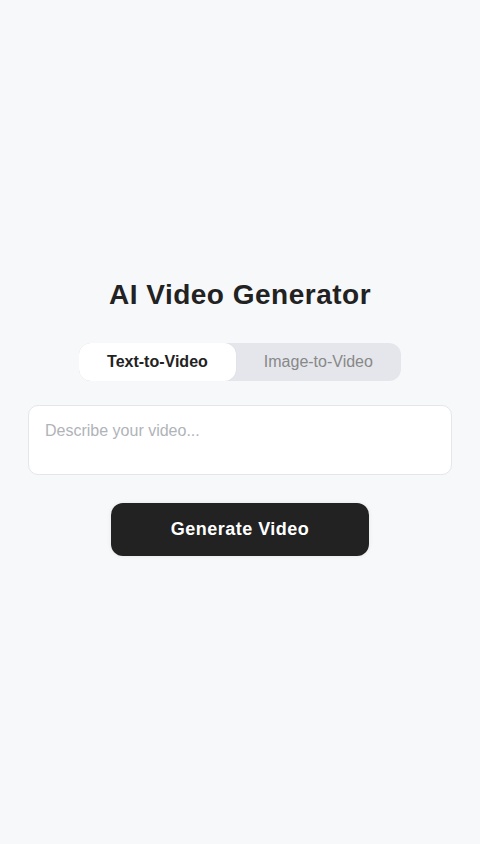
Build a native mobile app for AI video generation. The app should be designed for simplicity and direct use. Core functionality requirements: 1. **Main Generation Screen:** This will be the primary screen of the app. It should feature: * A toggle or tabs to select between two modes: "Text-to-Video" and "Image-to-Video". * A text input field for users to write their video description prompt. * An "Upload Image" button that allows users to select an image from their device's gallery. This is used for the "Image-to-Video" mode. * A prominent "Generate Video" button. 2. **Video Generation Flow:** * Upon tapping "Generate Video", the app should display a loading state to indicate that the video is being processed. This could be a progress bar or a simple animation. * The app will interface with a hypothetical external API (like Google Veo 3) for the video and audio generation. You can simulate this with a placeholder function that returns a sample video and audio file after a delay. * Crucially, every video generation request must also request and include a relevant, AI-generated audio track. 3. **Results Screen:** * After generation is complete, the app should navigate to a results screen. * This screen will display the generated video in a player with standard controls (play, pause, scrub). The audio should play automatically with the video. * Below the video player, include two buttons: "Save to Device" and "Share". 4. **App Architecture:** * Build this as a native app using React Native. * Ensure the UI is clean, modern, and intuitive. * No user accounts, login, or authentication is required. All functionality should be accessible immediately upon opening the app. * There should be no system for tracking usage, credits, or implementing paywalls. Use is unlimited.

© 2026 aSim. All rights reserved.
772
1
0
Build a native mobile app for AI video generation. The app should be designed for simplicity and direct use. Core functionality requirements: 1. **Main Generation Screen:** This will be the primary screen of the app. It should feature: * A toggle or tabs to select between two modes: "Text-to-Video" and "Image-to-Video". * A text input field for users to write their video description prompt. * An "Upload Image" button that allows users to select an image from their device's gallery. This is used for the "Image-to-Video" mode. * A prominent "Generate Video" button. 2. **Video Generation Flow:** * Upon tapping "Generate Video", the app should display a loading state to indicate that the video is being processed. This could be a progress bar or a simple animation. * The app will interface with a hypothetical external API (like Google Veo 3) for the video and audio generation. You can simulate this with a placeholder function that returns a sample video and audio file after a delay. * Crucially, every video generation request must also request and include a relevant, AI-generated audio track. 3. **Results Screen:** * After generation is complete, the app should navigate to a results screen. * This screen will display the generated video in a player with standard controls (play, pause, scrub). The audio should play automatically with the video. * Below the video player, include two buttons: "Save to Device" and "Share". 4. **App Architecture:** * Build this as a native app using React Native. * Ensure the UI is clean, modern, and intuitive. * No user accounts, login, or authentication is required. All functionality should be accessible immediately upon opening the app. * There should be no system for tracking usage, credits, or implementing paywalls. Use is unlimited.

Join Cory Walls on aSim
Scan to create your
own profile
Download on iOS
Download on Android